Avast, me hearties! International Talk Like A Pirate Day, September 19, is a wonderful way to introduce your kids to some colorful figures from history. will be the sixth an event your family will love celebrating. Started by John “Ol’ Chumbucket” Baur and Mark “Cap’n Slappy” Summers as a private joke, TLAPD has been celebrated around the world since 2002, when humor writer Dave Barry brought the holiday to the world’s attention. But if you need a little pirate prep before you don the eyepatch and hook, sail over to some of these Web sites:
Baur and Summers’ International Talk Like A Pirate Day site is a treasure trove of piratical fun and information. Although some humor leans towards the risqué, there’s a special section for Junior Pirates which includes a links page, lists of children’s books and even ideas for Pirate Math, Pirate Geography and more. You’ll also uncover links to pirate songs, art, videos, games, festivals and expeditions. Learn to parlay like a pro with the English-to-Pirate translators, and or use one of the Pirate Name Generator to discover your alter ego. The questionnaire at PirateQuiz.com is my favorite.
Pirate Guys Baur and Summers
If the end of the Pirates of the Caribbean series left you clamoring for more of Captain Jack Sparrow and the Black Pearl, Disney has a free online “massively-multiplayer” game that lets you forge alliances, hunt for buried treasure, battle evil undead forces, and use cunning and strategy to outwit your foes. With the Sony online version of the Pirates Constructible Strategy Game (which sadly is no longer in stores). You can hear the roar of cannon fire and the crash of waves in 3-D and challenge privateers from across the globe as you amass wealth and fame.
Pirate history is fascinating, and the National Geographic Kids online high seas adventure is a game that also tells you about actual people and events. For more true tales, the New EnglandPirateMuseum has educational articles on pirate lore such as the "Articles of Agreement" able-bodied prisoners signed to become pirates themselves. Rules were harsh: “If robbery took place between two crewmen, the guilty one had his nose and ears split and would be marooned.”
“Real Pirates” is the name of a traveling exhibit from the Expedition Whydah Sea-Lab & LearningCenter in Provincetown. More than 100,000 artifacts have been recovered so far from the slave ship-turned-pirate vessel which sank off Wellfleet in 1717.
What to serve your hungry crew on Talk Like a Pirate Day? The Seattle Seafair Pirates’ recipe for Salmagundi (the traditional pirate stew) calls for corned beef, anchovies, goat, pickled vegetables, and dried mango and begins “Hack meat into gobbets.” I use what I have around, but it still comes out great. Yo ho ho and a bottle of ginger ale!
UPDATE: Learn about miniature robots at the NISE nanoscience website.
With self-guided machines roving across Mars, exploring deep inside the Pyramids, serving as advance scouts for military operations, and vacuuming our floors, you could say the robot revolution has arrived. In the Jan 2007 issue of Scientific American on the “Dawn of the Age of Robots,” Microsoft founder Bill Gates pointed out parallels between the start of the personal computer boom and the robotics industry today, and predicted a future in which the devices will become as common and useful as laptops. Will robots improve life for humankind? Or will the artificial intelligences try to take over the world, as they do in so many books and movies? For now it’s hard to say, but one thing is certain: exploring the world of robots online is highly educational – and buckets of fun.
For all the robot websites out there, it’s hard to find one that sums up all the information to be had (and that keeps its links page up to date). But for junior roboticists, a good place to start is theNASA Robotics Alliance Project. It has news about robots in space and other settings, information on school competitions like FIRST, and even archives of online courses. Another site to try is Robots.net, a news blog that is updated regularly with links to stories of interest to robot geeks. Robot Magazine has one of the better links pages, which can take you to the sites of companies like WowWee, maker of Robosapien, Roboraptor and that creepy chimp head andiRobot, whose Roomba and Scooba floor cleaning robots are beloved by hackers who reprogram them to dance and sing. (In 2007, the company came out with iRobot Create, a pre-assembled programmable robot base for students and "serious robot developers" to personalize.) And Robot Cafe is a directory of robot sites for the home robot builder.
The history of robots goes back at least to the Victorian era and Boilerplate, a mechanical man, the hit of the 1893 World’s Exposition. While the Czech playwright Karel Capek first used the word “robot” in 1921, the father of modern robots – both fictional and real life – is generally considered to be the science fiction writer Isaac Asimov. His story collection I, Robot was the basis for the Will Smith action film (which until recently had a nifty website tie-in that let you “order” your own model in the colors of your choice). But you can still design your own robot on the website of the Museum of Science in Boston. The site of a traveling exhibit which made a stop there a few years back is Robots and Us, with fun activities that show how robots can move, analyze and even show emotion.
ASIMO, the little humanoid corporate ambassador for the Honda Motor Co., has concluded his tour of the US and settled into a new gig at Disneyland, where he demonstrates what the future of home robots may look like. ASIMO’s development over the past 20 years, including most recently released version, which can run at 4 mph, are detailed on the Honda website. But for many of us the first robots we probably ever saw were toys. Before Robosapiens, Aibo, and Furbys became household names, kids had to play with tin or plastic toy robots that didn’t really do anything – but they loved them anyway. The site Jeff’s Robots has a neat gallery of one (former) boy’s collection, robot art from comic books to sculpture, and info on famous robots from TV and movies.
Yes, robots are our friends, but even robotics experts can get paranoid sometimes. Daniel H. Wilson, Popular Mechanics’ online Resident Roboticist, is also author of How to Survive a Robot Uprising, a guide to protecting the species from annihilation. (Among the useful tips for spotting a rebellious robot servant: “Run for your reinforced-steel panic room if your servant disobeys you, even if it does so in a very polite manner.”) But it’s important to know whether your robot is really hostile: “Your robo-vacuum may be bumping into your feet in a malevolent attempt to kill you – or just trying to snuggle.” In other words, Bill Gates is probably right ... but it never hurts to be prepared.
UPDATE: There are a lot of robot-related computer programming sites for kids. They include Logo, Robocode, and Guido van Robot.
At the request of Bonny Glen, here's a list I've compiled of links to help kids learn computer programming. She's looking for Mac-compatible, we're PC, but hopefully some are useful. Just FYI, my older son started with an enrichment class using a really old version of Logo, has taken a few robotics summer workshops, and is currently trying to teach himself computer gaming coding.
Scratch -- Free Kids Programming Language from MIT
Guido van Robot: Guido van Robot, or GvR for short, is a programming language and free software application designed to introduce beginners to the fundamentals of programming. GvR runs on Windows, Macintosh, and GNU/Linux, in a variety of languages! It's great in both the classroom and the home as a way of introducing people to the basic concepts of programming.
Alice: Free teaching tool designed to be a student's first exposure to object-oriented programming. It allows students to learn fundamental programming concepts in the context of creating animated movies and simple video games in 3-D.
I have stopped writing Family Online columns (for the time being), but I am continuing to update posts as I find new websites. I will also try to add columns that are not online as time allows. Let me know if there's a topic you're interested in!
PS: Many of my posts for Wired.com's GeekDad blog include useful links. Check it out!
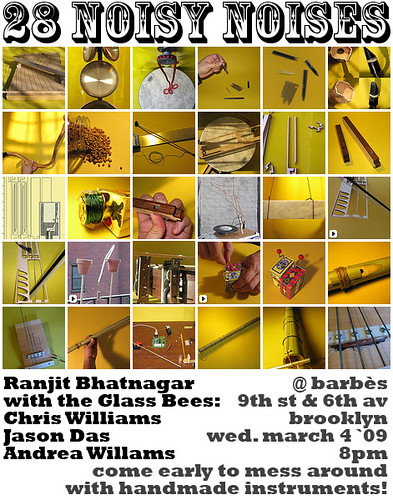
[Ranjit] Bhatnagar spent the month of February handcrafting a different musical instrument each day — 28 in all — as part of an online challenge called Thing-A-Day, which asks artists, inventors and anyone with a love of crafts to create something new every day for an entire month and document the process.
Making (Weird) Music -- Homemade Musical Instruments
One of the wonderful things about the Internet is stumbling upon areas of creativity you didn’t even know existed. I was looking for some musical crafts for kids (more on that later) when I discovered a whole world of hobbyists and artists who invent amazing musical instruments. Of course, homemade instruments are as old as the hollow reed, the washtub bass, and the one-man band. But these folks have taken recycled art to a whole new level.
Consider balloon player Judy Dunaway. Since 1990, Dunaway, who has a Ph.D. in music composition, has written over forty works for what most of us consider a party toy. Some links to audio samples (you may want to preview first) show how much more you can do with this “instrument” than mere squeaks. And if you caught the exhibit of Ken Butler’s “hybrid instruments” a few years ago at MASS MoCA in North Adams, MA (many of which can be glimpsed on his website), you know what results when you cross a telephone and a violin, or a checkerboard and a guitar. Perhaps the best-known instrument-inventors around are the members of the Blue Man Group. Their website includes details about such PVC-pipe creations as the “drumbone.” Then there’s Benjamin Franklin – statesmen, author, scientist, musical innovator. After hearing a concert played on wine glasses, Franklin came up with the “armonica,” a series of spinning glass bowls that allow the performer to create eerie chords. Dr. Mesmer used the armonica to induce hypnosis, and in the 1800s it was said to drive some listeners insane. Learn all about the armonica, try a virtual version, and listen to its sound, if you dare, at The Franklin Institute’s website.
If you’re looking for more, the website Oddmusic lives up to its name with a gallery of“unique, unusual, ethnic, or experimental” instruments, from the Stalacpipe Organ, to the Stroviols Ukulele, which looks like it’s got a tuba grafted onto it, to the Serpentine Bassoon, an electronic instrument made of red leather that resembles a Chinese dragon and sounds like an out-of-tune orchestra. One of my family’s favorite weird instruments, an early electronic device called the Theremin (think of the Beach Boys’ “Good Vibrations” or the soundtrack of the sci-fi classic, “Forbidden Planet”), has its own mini-section here. Another site, Experimental Musical Instruments, features on its gallery includes such wonders as the Video Octavox, an eight-armed device which sits on, and interacts with, a TV. (I couldn’t get the audio clips to play, but the images alone are worth a visit.)
Ready to build some instruments of your own? The kids’ section of the Dallas Symphony Orchestra website has make-at-home projects like a soda bottle Buzzing “Brass” Mouthpiece that demonstrate how the different members of the orchestra work. It’s a lively site with lots of pictures and audio samples of instruments, information on music theory and even games about composers, so be sure to look around while you’re there.
Then there’s John Bertles’s New York City-based group Bash the Trash, which teaches kids to make their own instruments from junk. Instructions are provided for both simple (shaker, horn, rubber-band guitar) and more complex (styrocello, thumb piano) instruments. More Bertles projects can also be found at the Instrument Lab section of the New York Philharmonic’s website for kids. Mudcat, a site about folk music and blues, has directions for a variety of blowers, including the garden hose trumpet and the drinking straw oboe, gourd rattles, drums, banjos and more. And Crafty Music Teacher has tips for building a PVC-pipe bass marimba for only $350 (hey, a real one costs 40 grand!), as well as ideas for house-key chimes, mallets made from superballs and car bushings, and other handy items.
If you’re a kid with a unique homemade instrument you want the world to see, you’re in luck. Teacher Elizabeth Rexford’s Virtual Museum of Music Inventions is a showcase for students who design, build, and write descriptions of their own instruments. There are stills and video clips of entries from past years, information for teachers, and helpful links. As Rexford says, using recycled material to create a new instrument is not just an art: it takes science and math to get it to sound just right. But most importantly, it’s fun -- and that’s music to any kid’s ears.
Math! Do your kids turn a sickly green just at the mention of it? Do you? People may TELL you math can be fun, even beautiful, but if you’ve never believed it, just spend an hour browsing the googles of math sites on the Web (a “google,” of course, is equal to 1 followed by 100 zeros) and you’re sure to change your mind…
Speaking of Google, if you visited that search engine’s homepage on February 3rd, you would have noticed that the logo was decorated with delicately colored designs. If you clicked on it, you were taken to images of Julia fractals -- swirls and shapes, kind of like the old Spirograph toy, that are the manifestation of mathematical formulas.
Why February 3rd? At first the kids and I thought we’d found the answer in that day’s comic pages, where a strip called “The Norm” pointed out that the date expressed in numerical form was 02-03-04. The real explanation turned out to be a nod to mathematician Gaston Maurice Julia, born February 3, 1893 in Sidi Abbes, Algeria. But the really cool thing was a morning spent talking and thinking about the power of numbers.
Some math websites can take you to new realms. Freelance topologist Jeff Weeks has online games including chess, tic tac toe and a mouse in the maze, all with a twist – the surfaces they’re played on curve through the fourth dimension. Amazingly, kids have no trouble figuring these out.
Ivars Peterson writes lively columns about mathematics for Science News (for grownups) and Muse magazine (for kids). Some of his finds include a guide to mathematics in “The Simpsons” (many of whose creators, apparently, hold degrees in physics and math); and an astronomer-turned-househusband who sells glass Klein bottles (the same shape used in the four-dimensional board games) on the side. You can peruse either version of Peterson’s past columns, complete with handy links, by going to www.sciencenews.org or by clicking on “Puzzle Zone” at www.sciencenewsforkids.org/and going to “MatheMUSEments.” To find a particular topic, Google “Peterson” plus “Science News” plus the topic.
Math problem got you stumped? Over 300 math students from colleges around the country will answer your questions at the “Ask Dr. Math” page of Mathforum, from DrexelUniversity. Dr. Math won’t do your homework for you, but if you show them how far you got, they will, usually, help you get unstuck. Mathforum also offers help for teachers and problems of the week for kids in grades three through twelve.
A good way to find sites that have been prescreened (and this goes for any subject) is to check out the “Links” page of a site you like. I found the website KaBoL (which stands for “Knot a Braid of Links”) run by the Canadian Mathematical Society, on Jeff Week’s site; here you can search from among nearly 300 websites for such topics as Geometry from the Land of the Incas and amazing geometric shapes built from Legos (with computer assistance).
Personally, the sites I liked best were the ones run by and for mathematicians (amateur and “real”). Lists of math links aimed at families tend to be either “schoolish” (i.e., too much like drills) or commercial (i.e., too much like video games and TV). Still, they’re sometimes worth exploring. The National Council of Teachers of Mathematics offers Selected Web Resources featuring “mathlets” (interactive math challenges) for teachers and parents. Organized by grade and topic in a clickable chart at http://illuminations.nctm.org/swr/index.html, you can skip the boring analysis of the site you want by clicking on “Direct to SWR.”
The math game sites listed by About.com’s parenting section are more the arcade type. They include the online companion to the PBS show Cyberchase, and Coolmath.com, which has some nice math graphics as well as “study tips” (and ads). Even the government wants a crack at your budding math whiz. The National Security Agency (subject of a novel by the conspiracy-minded author of “The DaVinci Code”) has a page where kids who are into code making and breaking can explore the rooms of a Cryptic Manor to find hidden links to puzzles.
In fact, when you add it all up, once you start looking for math online the choices are almost infinite. Happy calculating!
I can’t begin to understand the current economic situation myself, let alone explain it to my kids. But if ever there was a time to bone up on our country’s money system and how banks and businesses operate, this is it. According to The Wall Street Journal’s Work and Family column, even though kids don’t pay the bills, they know when their parents are under stress, and it can hit them hard. So for all you who are scratching your heads over how to explain what’s going on to your children, here are some online resources that can help.
First, some lessons in basic economics. For elementary and middle school students, most economics Web sites deal with concrete subjects such as coins and bills. For instance, H.I.P. Pocket Change from the U.S. Mint has light features like games, cartoon, coloring pages, as well as a more informational timeline that ties money in with history. At the U.S.Bureau of Engraving and Printing site’s kids section you can design your own bill, play trivia games or download an interactive animated tour through that looks at the new security features in currency and shows how Secret Service Agents are trained to look for counterfeiters. But if you’re interested in learning about economics concepts– including supply and demand, interdependence and the stock market – the Social Studies for Kids site explains things in a way preteens can understand.
One site that aims to teach kids how markets work is MinyanLand. The site, (which requires free registration, including parent’s email), aspires to a very lofty mission: “to help address the gap between classes created in part by the financial illiteracy of many in our country, if not the world.” Players choose a character and receive $50,000 in MinyanMoney and a condo worth $50,000. They can increase their virtual bank balance by “doing real-life chores your parents assign,” playing games, and keeping their creature healthy. They can also spend money at the mall, renovate their home, invest, and earn “incentives” for charitable giving. The site is a joint project of Minyanville (a private financial “infotainment” site featuring articles for families on explaining “depressing times,” afterschool jobs and allowances); the non-profit National Council on Economic Education (which offers classroom resources, many free); and the Kaboose network of family Web sites.
For tweens and teens most money sites talk about budgets, credit and spending wisely. Don't Buy It, a companion site to the PBS series, focuses on media and shopping smarts for 9- to 11-year-olds. It All Adds Up is somewhat creaky, decade-old interactive site that lets high school students see what it’s like to use credit to buy cars, electronics and other consumer items. I Buy Different comes from The Center for a New American Dream and the World Wildlife Fund. It helps kids make connections between the products they use and the environment, and suggestions actions they can take to make a difference in their community and across the globe. Many more wonderful links from places like MIT, the Rochester Institute of Technology and the Federal Reserve Bank of Minneapolis, have been collected at the South Plainfield Library’s Homework Links Consumer Education & Money Management page.
Finally, financial news outlets for adults can also help parents understand and explain what’s going on. Marketplace Public Radio recently spoke with Kiplinger's Janet Bodnar, for example, whose column “Money Smart Kids” has many useful pointers in its archives. The Motley Fool’s newspaper column and website explains stock market happenings in understandable terms, and MSN Money Central contains a useful section with tips on bargains and freebies that will help you and your kids save money. All these resources can be helpful to turn to during these tough times.
Helping people learn to use words well is a popular topic for online experts. The funny thing is, none of them agree how to do it. Some swear by spelling rules, while others focus on word origins or using tricks to memorize tough words. There are word games to practice skills, word-a-day email services to build vocabulary, and online dictionaries galore. Plus hundreds of sites for people who just love words.
The biggest problem you’ll have searching for websites about words and writing will be sorting through them. But do take the time to dig. You may discover the help you’re looking for in unexpected places, such as sites for parents of dyslexics or for adults learning English. Most sites are reasonably family-friendly. Some have separate sections for “rude” language; only a few have it mixed right in. Keep in mind that sites from outside the U.S. may use British spelling (“color” vs. “colour,” for example).
Search terms you can try include “spelling rules” (26,000 hits alone on Google), “spelling lists,” and “spelling mnemonics” (those little rhymes and sayings that help you remember how to spell hard words – extra points for spelling “mnemonics” right). Take a tip from those SAT prep classes and type in “‘word origins’ Latin Greek” to bone up on English roots; WordFocus.com is a good place to start.
Learning is fun with sites like David Appleyard’s guide to mnemonic initial sounds, which explains how Harry Potter fans knew right away that Slytherin and Snape were the bad guys. Build your family’s vocabulary one word at a time with A Word A Day, online or emailed right to you. Challenge your emergent readers at FunBrain.com. Or if you’ve got a kid who thinks it’s spelling that needs fixing, not kids who can’t spell (a notion that’s been kicking around for probably a century or more without much success – see “Adirondak Loj” near Lake Placid), send him to The Spelling Society for a look at their ames, offisers, leeflets, and so on (and a kids’ page listed in their links).
Many teachers believe the best way to improve writing skills is to write, a lot. Story starters, also called writing prompts, give budding authors fresh ideas. Younger children can try the examples at KinderKorner.com, while Everyday Spelling, the site that supports the textbook series, has writing prompts, word puzzles, spelling lists and more by grade through middle school.
The best online dictionaries, like Merriam-Webster, go way beyond a spellcheck and a thesaurus. Enchanted Learning’s picture dictionary for new readers not only links to related pages on the same site, it also comes in several bilingual versions. LibrarySpot.com has a list of specialty dictionaries, including OneLook.com’s reverse dictionary to find that word that’s stuck on the tip of your tongue. And word snobs can turn to the mother of all reference books, the Oxford English Dictionary, for word games from easy to “fiendishly difficult,” quotations, and much more.
Your kids don’t have to be serious word lovers to love the Spoonerisms, palindromes, and silly signs at Fun-with-words.com. But REALLY serious word lovers should take a peek at how the champs train at www.spellingbee.com, online home of the Scripps National Spelling Bee (which will hold this year’s televised finals starting June 1st). Who knows? They might just get inspired.
Even kids who have a real ear for music may have trouble learning to read a staff, with all its squiggles and dots and phrases in Italian. It can take a lot of work before those half steps and eighth notes all start to make sense. I know! When I was learning to play the violin, I could tell which notes went with which fingers on which strings -- but I never really understood how a scale worked until I began to play the keyboard. Once I saw all the notes laid out in front of me, in a nice repeating pattern of black keys and white keys, half steps and whole steps, suddenly everything became clear.
So when I realized the other day that the son who plays the violin was having trouble figuring out the key signature in his pieces, I sat him down at his brother’s piano to try to explain. But I figured there had to be more I could show him online – and, of course, I was right. I found web sites that help you figure out key signatures and much more. Learning to read music is useful, but learning to appreciate it is even better. Whether or not you believe in the “Mozart Effect” (the claim that listening to classical music can make a kid smarter) knowing how a symphony or a concerto is put together, and training your ear to hear themes and variations, can be as satisfying as solving an elaborate puzzle. Consider these resources your musical introduction:
Classics for Kids is a content-rich resource for kids and adults. First, you can listen online to 6-minute-long radio segments with Naomi Lewin that are all about classical music. Topics include composers like Mozart and Leonard Bernstein, musical periods like Baroque and jazz, and concepts like rondo and incidental music. Then there are the games that let kids compose simple tunes or quiz themselves on note names. Finally, parents can find articles filled with tips and advice, such as how to help kids practice effectively. There’s even a valuable page of music education links!
Big city orchestras are another place to find music info online. The San Francisco Symphony Kids’ Page is an interactive site that gives you a tour of the instruments of the orchestra. Other sections cover the symbols of the musical staff and concepts like tempo, rhythm, instrumentation and pitch. The Dallas Symphony Orchestra Kids’ Page, which got a mention in Family Online’s column about making instruments, also has an instrument dictionary and pages where you can listen to audio clips of intervals, arpeggios and chords. Meanwhile, at the Carnegie Hall website, interactive animated features let you explore Britten’s Young Person’s Guide to the Orchestra and Dvořák’s Symphony No. 9 "From the New World."
The Online Music Theory Helper by Ricci Adams from the Children's Music Workshop of Los Angeles isn’t flashy, but it takes you page by page through lessons on scales, chords and the like using the occasional animated note or audio clip where needed to make a point clearer. Quiz yourself on the notes of the staff or the keyboard using its “trainers,” or tune your ear to recognize intervals and chords. There are also useful articles that explain what to expect at a concert or how to deal with stagefright. The Music Room by Michael Bower of the CapistranoElementary School, also in California, is even more low-tech, but clear and easy to navigate. It includes pages with music clips on symphonic concepts like inversion and counterpoint, periods including Medieval, Baroque, and Romantic, the
For older kids and adults, Intro to Music Theory is a free online course from Connexions, a site for sharing free educational material, by Catherine Schmidt-Jones. Actually, it doesn’t look to be much more detailed than the sites mentioned above for younger musicians. There are hyperlinks but no animations interval, major and minor keys and scales, triads and chords; its big plus is that the whole course can be downloaded as a PDF file.
OK, so the “Mozart Effect” may not be real. But listening to classical music can’t do any harm, can it? Just ask anyone who can’t hear the William Tell Overture without thinking “Hi Ho Silver! Away!” Movies, cartoons and TV shows that use famous symphonies and concertos as soundtracks and theme songs can make those musical motifs stick with you forever. Remember when Casper the Friendly Ghost helped Schubert finish his Unfinished Symphony? Or Bugs Bunny’s immortal “What’s Opera, Doc?” As a recentstory on National Public Radio’s Weekend Edition points out, you can find many of these masterpieces (including “The Rabbit of Seville,” and the “Fantasia” parody “A Corny Concerto”) on YouTube. Share a few with your family; you may never be able to listen to classical music the same way again.
Update: The excerpt above is from the PBS show From the Top. The website offers streaming video of really talented kids playing classical music. http://www.pbs.org/wgbh/fromthetop/pages/
MusicTeacher2009 is another YouTube video to check out. Thanks to the anonymous commenter!
Despite their ickyness, bugs are really fascinating creatures. Insects, spiders, and other creepy crawlies make up most of the animal life on Earth, both by number AND by sheer mass. In fact, there are more different types of beetles alone than there are plant species! And insects have been around 350 million years longer than we have (humans only appeared 130,000 years ago). With bugs such a major part of our world, you might as well learn more about them. Who knows? You might even grow to like them.
The first step in finding out about the bugs around you, of course, is figuring out what kind you’ve got. That’s where the Web site What’s That Bug? comes in. Created as an art project by California photography professors Daniel Marlos and Lisa Anne Auerbach, here you’ll find gorgeous photos sent in by readers, with helpful (and often funny) comments. The British-based What’s This Caterpillar? has a North American section. Bug Guide is an online community of amateur naturalists hosted by Iowa State University Department of Entomology that collects information on where and when bugs are found for scientists’ use. The guide sorts its bug pictures by class (arachnids, insects, centipedes, etc.) and even includes a section on bugs that have immigrated from other countries, such as a tortoise beetle found on a bunch of bananas from Ecuador in a grocery store in New Mexico. Ask Dr. Bug doesn’t have a lot of photos, but you can email Entomology prof Bob Allen from CaliforniaStateUniversity, Fullerton for an ID. (Dr. Bug says 95% turn out to be potato bugs, disturbingly human-featured cricket-like critters which, thankfully, only live in the Southwest and have their own site, PotatoBugs.com.)
Articles on bugs (for reports or your own interest) can be found at sites like Bug Info, from the Smithsonian Museum of Natural History, and the Australian Museum Online, which offers nicely presented information and printable fact sheets on bugs from all over. Bug Bios is a unique site with photos, a Cultural Entomology that talks about bugs in art, literature, religion, etc., and an extensive links page.
Want to invite bugs to your backyard? Monarch Watch has a section on growing milkweed and other plants to create your own butterfly garden. If you’re thinking of keeping a bug as a pet, The Amateur Entomologists' Society has caresheets for everything from crickets to tarantulas. The retail site PetBugs.com has tips for making your bugs cozy. EarthLife is a site with lots of links on bugs, including pet info. And the MissouriBotanical Garden’s ButterflySchool tells you how to make your own butterfly house. If you’d rather visit bugs elsewhere, you can check out the MontréalBotanical Garden’s Insectarium, the largest in North America, which even looks like a bug when viewed from the tower of the nearby Olympic Stadium. Or you can watch live leafcutter ants scramble about their “formicary,” or glass ant case, at the LondonNaturalHistoryMuseum’s Antcam.
Alright, so you don’t want to make friends with bugs. But you still might like to invite them to dinner – that is, if you’re an adventurous eater! The PBS TV series NOVA has a slideshow on people eating bugs around the world. And IowaStateUniversity's Department of Entomology offers Tasty Insect Recipes like Banana Worm Bread and Chocolate Covered Grasshoppers. Of course, you don’t have to get that intimate with insects to appreciate them. But now that you know how interesting and beautiful they can be, you may not be so quick to squish the next bug you see.
EXTRA: Find links to bug crafts I made and demonstrated during my Bug House workshops at my website Crafts for Learning!
I’m one of those people who likes to enjoy a magic trick without trying too hard to figure out how it’s done. But as the mother of a budding magician, I’ve had to acknowledge the fact that a lot of magic involves gimmicks bought in magic shops. Luckily, though, not all magic tricks require special equipment. You can start doing magic with only a deck of cards, a piece of rope, and a few coins. Here’s what my son Anthony has learned so far about being the art of prestidigitation:
·The easiest tricks to start off with are rope tricks.
·Once you know the trick and the secret move, practicing is fairly easy. I try to practice as much as possible whenever I learn a new trick.
·It’s best to talk over the part where you have to make a secret move, so people don’t know what you’re doing.
·I love the look on people’s faces after you perform a magic trick.
Anthony got his start in an afterschool magic class, but there are plenty of Internet resources if you want to learn some easy tricks at home. Parents who want to encourage a child's interest in magic can also check out the Web site Kapoof! Magic You Can Do, where teacher Andy Makar offers advice, a library of tricks, and lots of links. The family-created Kidzone from DLTK has a section on magic tricks for children as well.
Other worthwhile sites include Anthony’s pick, The All Magic Guide, which offers a variety of trick instructions with photos, magic show videos and more; How to Do Tricks, which also includes coin trickery, levitating illusions and street magician tactics; Good Tricks, where you can learn the secret behind “mind reading” demonstrations; and Mighty Tricks a blog that has not been updated recently but which still offers interesting videos and some super magic tricks. You can also find a comprehensive links page at Magic Tricks.
Perhaps the best way to learn how to be a magician may be to watch a master in action. Endurance artist David Blaine, who has lived in a fishbowl in LincolnCenter and hung suspended over London in a glass box for 43 days, has videos of both his stunts and some card tricks at his Web site. For other famous magicians, however, you’ll have to do some searching on YouTube. We enjoyed seeing clips of David Copperfield disappearing the Statue of Liberty and walking through the Great Wall of China. The comic duo Penn & Teller have some interesting segments where they give away the tricks of the trade by doing the popular cup and ball sleight of hand with clear plastic cups. But the present-day performer we enjoyed the most was Criss Angel. On his A&E show Mindfreak, Angel takes his illusions to the street, enlisting passersby who are shocked (and sometimes horrified) at some of tricks. He does some beautiful levitation from building to building, but he also does coin swallowing and voodoo doll routines that are on the gruesome side. For many fans of magic, however, the brush with death is what makes it so exciting.
Of course, the granddaddy of all showmen was Harry Houdini. You can watch silent film clips of Houdini’s escapes, and play an online escape game, on PBS American Experience. The Library of Congress has an online collection of Houdini documents. And The History Museum at the Castle in Appleton, Wisconsin – where the magician lived when his family first came to America from Hungary in 1878 – has an online exhibit called “AKA Houdini” about the man and his times. Magicians today still try to top Houdini’s tricks, but few succeed. Maybe – with a little practice – you can be the one to match his amazing feats!
Update: We just had a great time at the exhibit Magic: The Science of Illusion at the NY Hall of Science. Be sure to catch it if it comes to your area!
Two hundred years after Charles Darwin’s birth – and a century and a half after the publication of his book On the Origin of Species – the theory of evolution is as controversial as ever. In the United States, that is. According to a 2005 New York Times article, the idea that complex organisms developed from simpler species through random mutations is almost universally accepted in every other industrialized country. Ever since John Scopes went on trial in Tennessee in 1925 for telling his biology students about natural selection, however, American school teachers have shied away from discussing evolution in the classroom. Generations of us have grown up not really understanding evolution or the process by which scientific theories are tested and confirmed. So with a year to go until Darwin’s 200th, intelligent educators and scientists have designed Web sites to supply those missing links.
SwathmoreCollege biology professor (and father of two young children) Colin Purrington believes parents can begin to “homeschool” their kids about evolution as early as kindergarten. And a fun place to start is Alaskan marine artist Ray Troll’s Web site Troll Art. Watch a single cell morph into a human being on Troll’s Evolvovision, then click on his somewhat retro comix-style poster The Way We Were: The Path of Human Evolution to read explanations by fish biologist Carl Ferraris. The site Becoming Human, from The Institute of Human Origins at ArizonaStateUniversity, challenges you to assemble a chimp and a human skeleton from a mixed pile of bones. And the Natural History Museum of London’s Evolution Web page includes a natural selection game where you play a young bird trying to eat enough bugs to get through the winter.
The PBS Evolution Web site is another great resource for kids. There’s a whole library of interactive features, including games like Evolution in Action, which that lets you change the environment to see how random mutations affect a creature’s ability to survive, and The Mating Game, where you help contestants pass their genes down the evolutionary line. There’s also the PBS series Nova’s Missing Link and Origins pages.
Still confused? Understanding Evolution, a collaboration of the University of California Museum of Paleontology and the NationalCenter for Science Education is a comprehensive, clearly written site that touches on science, history, research and how evolution factors into daily life. There are explanations of the role DNA plays, common misconceptions and dozens of useful links. Or to find out more about the descent of man, check out the Smithsonian Institution’s Human Origins Program. Wander through the online Hall of Human Ancestors, then click on a branch of the Human Family Tree to look at virtual 3D fossils and read about human precursors.
In recent years February 12, has been celebrated as Darwin Day, with Phylum Feasts (including foods from all the plant and animal groups) and Primordial Soup, plans for a recreation of Darwin’s exploratory journey to the Galapagos islands on the HMS Beagle, and re-enactments of the Scopes Monkey Trial. The trial, which pitted celebrity lawyer Clarence Darrow against politician William Jennings Bryan, as recorded by humorist HL Mencken, is a fascinating piece of social history. My family watched the slightly fictionalized version told in the Spencer Tracy film Inherit the Wind, then checked the facts at the Famous Trials in American History Web site by University of Missouri law professor Douglas Linder.
It took Darwin 20 years to publish his theory of evolution, as you’ll learn from the companion Web site to the traveling exhibit which stopped at the AmericanMuseum of Natural History in New York in 2006. But you shouldn’t wait so long. Evolution is the unifying principle in biology, says Swathmore’s Purrington, make sure your kids have the facts they need to begin to understand the mystery of life.
Update: Find more evolution resources for kids at my blog Home Biology!
Family Online Picks (with additional links added):
Cops and robbers? Old hat. Nowadays, crime-fighting kids would rather look for fingerprints and DNA samples than chase bad guys with guns. The hit CBS TV drama CSI: Crime Scene Investigation has spawned a whole generation of kids who want to try toxicology (finding drugs or poison in the body) ballistics (matching patterns on weapons and the crime scene) and forensic anthropology (examining skeletal remains) to figure out who dunnit. And educators and educational websites are jumping on the trend. Even if you don’t have a crime lab in your home, you and your kids can investigate cutting-edge police techniques – and learn a little science -- on these sites.
(Note: You may want to preview these sites, which after all deal with murder and mayhem, before going on them with younger children. Sites that are suitable for little kids are indicated.)
Fans of the CSI franchise can find several sites directly related to the show. The CSI Handbook on the show’s official website is a clickable illustrated glossary of terms used by Crime Scene Investigators to describe evidence, tools and procedures. And the Boston Museum of Science’s recent exhibit, CSI: The Experience, has a website with a printable Family Guide containing at-home activities like analyzing blood spatter (using the fake blood recipe provided) and extracting DNA from fruit. There’s also a CSI Web Adventure from Rice University that takes you through the steps of analyzing crime scene evidence in a police lab. You can find a page of related links too.
Other interactive websites for kids include Anatomy of a Murder from the Montreal Science Center, where you help forensic experts in an animated crime scene. (Scroll down to “Interactive File On Criminalistics.”) Then there’s the Virtual Museum of Canada’s Interactive Investigator, which lets you explore a cartoon crime scene, collect clues and send them to the lab to be analyzed. (Both websites are also available in French.) At the PBS NOVA website, you can click-and-drag objects create a DNA “fingerprint” in a non-gory cartoon lab to solve the mystery of who stole a lollipop, and read about the new 3-D mug shots. (The rest of the website related to the program "The Killer's Trail," about the re-opening of the 1954 murder that inspired “The Fugitive,” however, is not as kid-friendly.)
For more activities you can do at home, the children’s site CyberBee has a Who Dunnit? section that tells you how to practice taking fingerprints, make impressions of teeth, and calculate a person’s height from the size of their shoe. Or watch two girls solve the mystery of a birthday party mess on an online episode of the PBS Kids show DragonFly, which has also suggestions for exploring evidence like bicycle tire tracks.
Older kids can find lots of good information about Forensic Entomology -- studying insects and insect eggs around dead bodies to determine the time or location of death – at the WhyFiles from the University of Wisconsin. If that’s too icky for you, there’s also an article on document analysis, including whether you can tell someone’s personality from their handwriting. (Most scientists say no, but in France 70 percent of employers use handwriting to screen job applicants.) The popularity of CSI and similar shows has its good side and its bad side. The bad side, according to National Geographic, is that the so-called “CSI Effect” means jurors now expect more DNA and high-tech evidence before they’ll convict a defendant – even if it’s more traditional proofs are already available. But for students – questions of the effects of violence on television aside – the “CSI Effect” has been a positive thing. An article from the National Science Teachers Association says that kids who took a “Draw-A-Scientist Test” created fewer portraits of mad scientists and more images of regular men and women having fun in the lab. The kids give CSI the credit – and that’s almost as good as catching crooks.
Do you know what you want to be when you grow up? A lot of kids (and even some of us adults!) could use some help figuring out that important question. In the old days, you could go to the school guidance counselor to take an aptitude test. After answering some multiple choice questions about your interests, strengths and personality (“Are you prone to (A) exploring the possibilities or (B) nailing things down?”), you would find out whether you were hairdresser or rocket scientist material. Another tactic was to thumb through an enormous volume called the OOH – Occupational Outlook Handbook. Today you don’t need an appointment with your guidance counselor to start your career exploration, because many of these tools are available on the Internet. Unfortunately, they’re not always free, and they can be complicated to use. But if you’re just looking for ideas and suggestions – not a detailed, personalized analysis -- there are a few good places to begin your search for the job path that will suit you best.
The OOH, put out by the U.S. Department of Labor’s Bureau of Labor Statistics, has descriptions of hundreds of different occupations. It tells you what the job is like, education and training requirements, how much it pays, and whether the need for people in that job is growing, staying the same, or shrinking. And not only is the online version less of a strain on the shoulders than the hardcopy, it’s also easier to browse, thanks to the website’s search features. It also has links to professional organizations and other places where you can find out more about the job that interests you. Not everything about it is high-tech, though. Like the book, the website’s information is only updated every two years, so some statistics in the 2006-2007 edition go back to 2004 – eons when it comes to some areas of the job market. But the BLS website does offer archives of the Occupational Outlook Quarterly magazine (the most recent being Summer 2007) and other resources. There’s also a well-designed kids’ section with a little less detail and links back to the main OOH.
Many professional organizations themselves have kids’ sections with information about different specialties and how to enter the field, such as Ocean Explorer, Young Eagles (aviation) and the US Dept. of Agriculture.
For general information, the University of California at Berkeley’s online Career Library has links to career descriptions from other reliable sites, including the Department of Labor and other colleges. Another valuable resource is the VocationalInformationCenter for high school students, created and maintained by retired educator Kathryn Hake. Hake’s site focuses on technical and vocational careers and trade schools. The College Board, maker of the SATs and Achievement Tests, also has a Majors and Careers section with general information. Pathways to the World of Work, which has links to sites about self-assessment and career exploration, is a website for teens from the Connecticut Department of Labor. And the New York State Dept. of Labor Career Zone for teens presents current and relevant occupational and labor market Information in a clear and interesting way, making career exploration and planning fun and easy.
And if you’re curious about online aptitude tests but don’t want to shell out the subscription fee, there are a couple sample tests you can try. RutgersUniversity’s Pre-College Career Planning webpage offers a free “interests assessment” based on John Holland's “Theory of Vocational Choice,” which classifies students into six different categories: realistic, investigative, artistic, social, enterprising, and conventional. And the Princeton Review, the well-known test-prep company, has a free 24-question Career Quiz that rates your interest and job style. Some organizations, like Boys and Girls Clubs and Junior Achievement, have free online tests that are available to members only, although Junior Achievement’s career information pages are open to all.
Remember, take any career aptitude tests with a grain of salt. I tried three different surveys, and came up with three different versions of what I’d like best! Experts say the most useful thing about interest assessments is the possibility they’ll point you in some unexpected directions. That perfect career is out there – so get looking!
Why are Lego toys so much fun? It might be their bright colors. It could be the cool themes such as Star Wars, Bionicle (a mystical storyline about biomechanical warriors with magical masks, with related books, movies and comics), Exo-Force (a line where humans take on robots wearing giant battlesuits) and others. Or maybe it’s the playability that lets you can take apart a set and make a whole new model. Whatever the reason, Lego has a giant fanbase, from 5-year-olds to Adult Fans of Lego (AFOL). And those fans have made several websites about their favorite subject: chat rooms, databases and even “my own creation” (MOC) sites, where you can upload pictures of Lego models you’ve designed yourself. Although most sites are for AFOL, there are some just for younger fans. Here are my favorites:
I had been a big Lego fan for a few years when I discovered Lego.com, the official Lego website, at age 11. Lego.com has good places for fans to talk to each other, post photos of models they’ve made, and see new Lego sets. It also has Lego Factory, a part of the site where you can download software which lets you make a 3-D drawing of a Lego model, then upload it to Lego.com and show it off, or even buy your model. In the Pick-A-Brick section, you can buy single bricks instead of a whole set. And you can even enter in codes from Lego Bionicle and Exo-Force sets to get cool online stuff!
For a while I posted on Lego’s message boards, but it wasn't long until I started looking at the fansites, especially those for kids. BZPower is the main Bionicle fan site with over 37,000 members, and the top Bionicle news source. Members discuss topics like the most heroic heroes and villainous villains or which set they regret getting.My own websites -- Lair of the Piraka (a Bionicle forum) and The Robot’s Workshop (an Exo-Force forum) -- don’t have many members, but they are starting to get more.
For AFOL, Eurobricks has large forums to post in and the latest Lego news. And the news from Europe often includes photos of sets that haven’t been released yet. Some sites won’t post leaked images, some forbid even discussing the future sets, but they sure are tempting. A tip about posting in general: make sure you follow the rules, such as not creating duplicate topics or adding to “zombie topics” (topics that haven’t had new posts for a long while). Some of these sites will ban you if you don’t.
Brickshelf is a photo-hosting website just for Legos, where the tags include train layouts and snapshots of the Legoland theme parks. But most MOC sites let you post photos and get comments on them. MOCpages features large models like the diorama combining characters from Indiana Jones, Dr. Who, and H.P. Lovecraft, or the Blacktron Intelligence Agency, a space base that takes up four tables. From Bricks to Bothans, the main the Lego Star Wars fan site, also has photos of Star Wars MOCs and a forum where members can comment.
Then there are Lego databases like Brickset, which lets you search by theme or year, going back to 1961. Members can keep track of all the sets they own -- and make wishlists of the ones they want. Brickwiki, which is (as the name suggests) a wiki about Lego, has information on its history, themes, and famous people (according to Lego fans), along with different building techniques such as SNOT (“studs not on top” – in other words, upside down). There are also links to all the other major Lego sites.
From grandfather clocks to harpsichords to automated factories that use Lego Mindstorm computer technology to build cars out of Lego pieces, there’s practically nothing that hasn’t been made out of Legos. Professional Lego model builders can make you a Bart Simpson or a mosaic of the Mona Lisa to order. But perhaps one of the strangest projects is the Brick Testament, where a minifig Adam and Eve live in a Lego Garden of Eden. Maybe the best part of Legos is that, no matter what your interests, it’s so easy to join in the fun.
If you’re a kid, you’ve probably never heard of Mr. Wizard. And you’ll never know the thrill of owning a genuine Mr. Wizard chemistry set. Mr. Wizard, otherwise known as Don Herbert, hosted TV’s first science show, back when kids were encouraged to go out and experiment with chemicals, rockets, and other exciting phenomena. But because times have changed, a company that recently tried to update the Mr. Wizard chemistry set had to settle for balloons, clay, and laundry starch instead of the chemicals included in the original set. And it’s not just toys that have changed: even some schools are cutting back on chemistry labs. As a result, one classroom chemistry expert told Wired Magazine last year, “Kids are being robbed of the joy of discovering things for themselves.”
But doing science at home is not a lost art. It may take some effort, a willingness to get messy, and an eye towards safety, but many of the materials needed for exciting at-home experiments are still available, if you know what to look for. And as usual, the Internet can help. With projects for everyone from the faint-of-heart to the foolhardy, you’re sure to find something on the websites below that send adults and kids alike rushing to turn your kitchen or workshop into the family laboratory.
Mr. Wizard famously inspired a generation of scientists, teachers, and science showmen, and leading the pack right now is Steve Spangler. Remember the Diet Coke and Mentos craze? That all started with a video segment Spangler did for his local Denver NBC affiliate. His website has tons of uncomplicated video and written experiments in categories such as States of Matter, Light and Sound, or All about Air. There’s so much good content here, I don’t even mind that it’s primarily an online catalogue for Spangler’s science toys, kits and supplies. (And by the way, the products -- aimed at elementary school age and younger -- are excellent.)
Science educator Robert Krampf, who takes his live high-voltage electricity show to schools for Florida Power and Light, also offers nearly 30 fun and easy science video clips on his website, just a fraction of the 300 plus at-home explorations you can read. They may not be as dramatic as a traveling million-volt Tesla coil, but they’re still pretty cool. Join Krampf’s YahooGroup to get an Experiment of the Week emailed to you or just browse the archives. Like Spangler’s experiments, Krampf’s activities are simple enough for younger kids, but they include suggestions for continuing the experiment at a higher level.
Want more of a challenge? Hila Science Camp in Ottawa, Canada has online directions and videos for such projects as a lemon battery, a two-tone alarm with a paper cone speaker, a printable star finder, and a medieval trebuchet for storming castles. The graphics on Teacher Slater Harrison’s Science Toy Maker website may look out of date, but the projects -- a Bangladesh toy steam boat, an air rocket and launcher, and an electronic lie detector -- are exciting and kid-tested. There are also lots of links to other science activity sites, too, such as the video search engine Science Hack, which promises that every entry is screened by a scientist. Finally, if Danger is your middle name, you’ll love SciToys. Not just because the Fresnel Lens marshmallow cooker starts flaming within seconds, or author Simon Quellen Field will email you right back with the answer to a question about building it. It’s because the projects have scary names (the Plastic Hydrogen Bomb is really a high-tech squirt gun), and they work. The SciToys catalog is also a good, cheap source of materials used in projects.
Don Herbert passed away in June at the age of 89, but his spirit lives on. So release your inner science nerd, take the family outside and drop a tube of Mentos into a bottle of Diet Soda today!


![Reblog this post [with Zemanta]](https://lh3.googleusercontent.com/blogger_img_proxy/AEn0k_t5UmXCMtHJnbLjBClTk41YMYCQ0AmqtD25xyNCkqFdcap56vNm8wpmYxd5zu89r6EJcqkpTSG6mnBSWtxOKNgboUJ_lBey0SOaIv7yBnW7-VbcpkQo9eBoy2Lc2wba4wwq3foszlxZj8C2MqYksNA=s0-d)


![Reblog this post [with Zemanta]](https://lh3.googleusercontent.com/blogger_img_proxy/AEn0k_sPeK3g0Uq5SEYTs5vZLRY7WX_A4sAwUQ1ZVStbO_o9TCoO6l7PsMlju5DVb7UANY3TJqpgBLsIJ3cTCjc6iqXwVxhMs4gxf7MF5--XJXWbm_rU1YLcNRBraEp1VcT3c49i7VgJEIvp_lI4i8xQW3Uw=s0-d)